Plaky and Pumble integration
As part of the CAKE.com Suite, Plaky and Pumble can be integrated in the workspaces within the same organization. When you update your tasks in Plaky, other users subscribed to that task receive notifications in Pumble and get updates on the project progress.
This integration bridges the gap between project implementation (Plaky) and team communication (Pumble), where the notifications from Plaky provide timely updates to the stakeholders and team members in their respective Pumble accounts.
Before you begin #
To use this integration, you must have the following:
- A board in a Plaky workspace
- A channel in a Pumble workspace
- A workspace owner or admin to configure the board automations, users to set up their Preferences in the settings
Integration features #
Status notifications #
In the Preferences page, you can select which notifications you want to receive from Plaky, such as getting assigned to an item or when an item you are subscribed to was updated (e.g. change from “In progress” to “Done”).
Each notification you receive in Pumble contains the information that was updated in the Plaky card as well as who initiated the change.

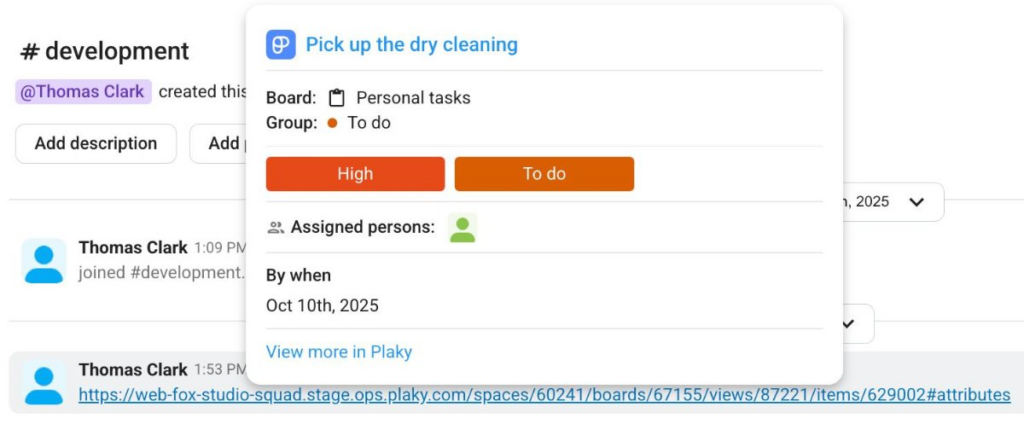
Cross-platform link previews #
Notifications also contain the link to the Plaky card associated with the change. Click on the link and it will take you to the Plaky board where you can view the update in more detail or take action if necessary, such as update the status or reply to a comment.
Critical Updates #
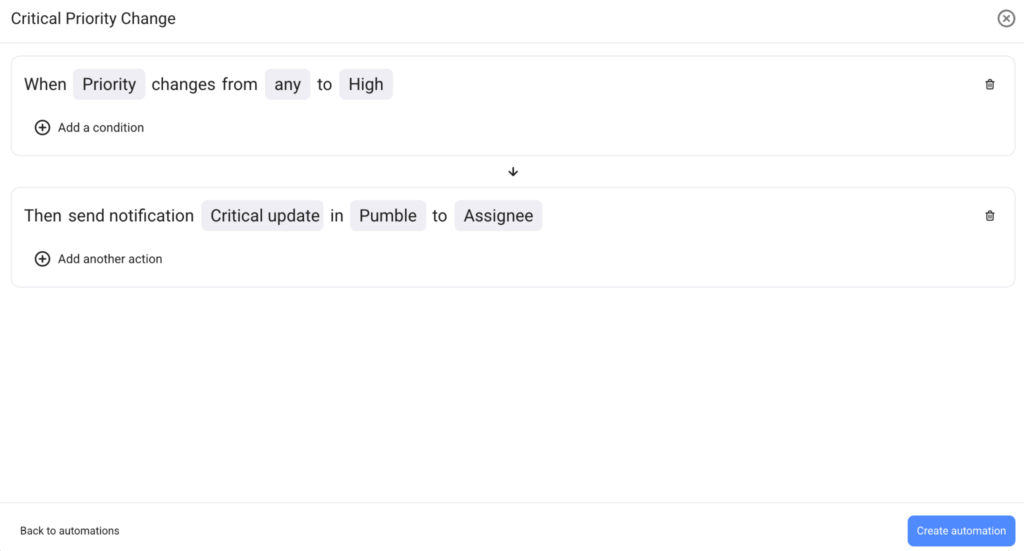
If you are a board owner, you can now create board automations that can send notifications for critical project updates such as items changing priorities (e.g. change from “Medium” to “High” priority) or changing deadlines. With these board automations, you can choose to send the notification to a specific person in Plaky or a specific channel in Pumble.
Turn messages into tasks #
You can quickly create a Plaky item from Pumble while discussing topics in the channels or by using the / menu in the message box, which eliminates the need to switch tabs for creating an item. Once created, you will also get notified when you have successfully created the item.

How it works #
To use this integration:
- Configure notifications: Enable Pumble notifications in personal user preferences or create Plaky automations
- Create tasks from chat: Use the shortcut menus in Pumble to create tasks directly to a Plaky board
- Receive live updates: Any change from Plaky sends a notification in Pumble
Data flow #
The table shows how the data flows from Plaky to Pumble (or Pumble to Plaky).
| Source | Action | Result |
| Plaky | Item/subitem change | Automatic notification in Pumble: “Change on the item you’re subscribed to” (e.g. status change / group change / team change) with change details and direct link to the Plaky item |
| Plaky | Item/subitem assignment | Automatic notification in Pumble: “You’ve been assigned to the <item/subitem> as <role>” with direct link to the Plaky item |
| Plaky | Mentions in comment/reply | Direct mention in Pumble: “You’ve been mentioned in a <comment/reply>” with direct link to the Plaky item |
| Plaky | Board automation triggered (e.g. Priority update, Due date modification) | Notification in Pumble sent to the assigned channel or team with details about the change |
| Pumble | Create Plaky item from message menu | New task card created in the selected Plaky board, confirmation notification in Pumble |
Learn more about the Plaky and Pumble integration by watching this video.
Next steps #
Check out this article for a step-by-step guide on how to integrate Plaky and Pumble and start using this integration.