Year after year, our developers listen to our users’ needs and deliver outstanding features, updates, fixes, and integrations.
Last year was no different.
Here’s the CAKE.com overview of the most important updates we witnessed in 2025.
Winter
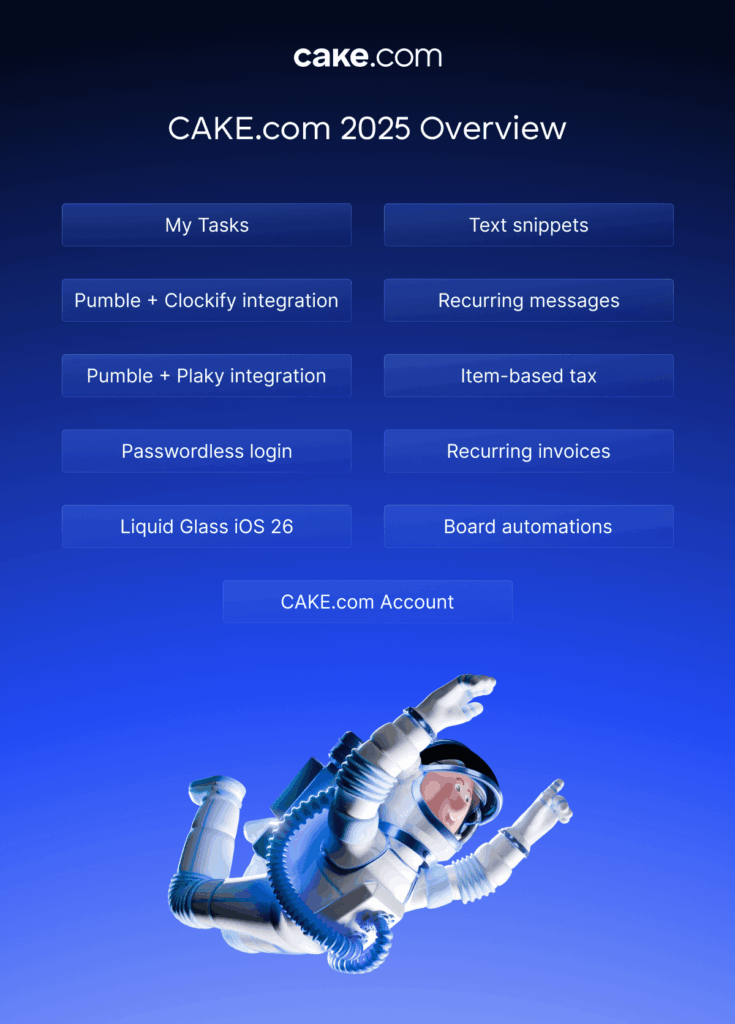
We ended 2024 strong by launching a unified CAKE.com Account. At the beginning of 2025, we migrated all the new users and started migrating the old users to the account.
Users with multiple workspaces naturally had multiple organizations in the CAKE.com Suite. So, we enabled transferring workspaces to organizations to enhance centralization.
Clockify
Clockify got a new invoicing feature — item-based tax — that lets users decide which tax they’ll apply to which item individually. This new option makes complex tax calculations more precise, giving users more control over taxation. It also helps users avoid errors in determining the final cost of tax and create invoices faster.
Learn more about item-based taxes: How item-based taxes work
Pumble
For Pumble, we increased the number of participants on group calls, allowing teams to enjoy high-quality video calls with more teammates than ever.
Pro plan users can now host 50 people in a video call. Business, Enterprise, and Bundle users can host up to 100 people.
Effortless communication begins with Pumble
Enjoy unlimited chat history, threads, public and private channels, high-quality video calls, and more.
Spring
In spring of 2025, we continued to work on improving our existing features and coming out with new ones.
We also finalized the CAKE.com migration, and all the existing users were migrated to CAKE.com Accounts.
Clockify
In Clockify, we changed the default daily capacity from 7 to 8 hours.
The time tracking reminders can now also take time off into consideration for all paid plans (Standard, Pro, Enterprise, Bundle). For example, if you have 2 hours of approved time off, the reminder will be sent if you haven’t logged 6 hours in total that day.
Clockify Owners and Admins now also have the option to add members to projects when they’re adding time for those members, making time allocation much simpler.
Pumble
Pumble users finally got call reactions, which ultimately enriched the video call experience. This feature is available to all users and on all devices.
Additionally, it is now possible to quickly invite individual and group users to the channel in which you want to mention them. There’s no more need to leave the chat, search for team members, and invite them — now you can do it in a split second.
We also updated the People & User Groups section. Business, Enterprise, and Bundle plans now have a redesigned overview of the section, with cool new options to boot. For instance, you can create new user groups and delete inactive ones, preview all group members and add new ones quickly, and more.
Plaky
As for Plaky, web, Android, and iOS users now have the option to search anything with diacritics (ćčšž..) or without them, as the search option will return results whether you type s or š, c or ć/č, etc. Overall, this makes searching and filtering easier and more efficient.
Additionally, users cannot edit other users’ comments in Plaky anymore. The Board Owners do have the option to delete any comment they deem necessary, but editing them is off the table.
Manage projects like a pro
Assign tasks, set deadlines, track progress, and keep collaboration focused with comments and file sharing — all in Plaky.
Summer
Summer was quite a prolific time for CAKE.com devs in terms of new features and integrations.
The CAKE.com Account got one small but key improvement — CAKE.com invitations could be revoked in the Members page.
Clockify
Clockify users now have multiple API keys they can use for different purposes, instead of a single API key. Furthermore, you can create new API keys or deactivate them once you no longer need them.
Also, users on all plans have team filters and a customizable team page. This means you can easily filter team members based on various criteria, e.g., account status, billable rate, roles, work capacity, etc.
Finally, we integrated Clockify with Pumble, allowing users to receive reminders and notifications from Clockify directly in their Pumble DMs. So, now, whenever your time off is approved, or you haven’t tracked enough time for the day, you’ll get a direct message in Pumble.
Learn more about Clockify + Pumble integration here: Time tracking notifications in Pumble
Pumble
Pumble improved its recurring messages functionality by allowing users to schedule messages for later and send them at set intervals. You can send useful reminders and updates this way, ultimately automating team communication.
Users also have the option to browse attachments in chats, which makes it so much easier to find answers to your questions. Additionally, owners and admins can actually delete private channels they don’t have access to via API.
Most importantly, we successfully integrated Plaky and Pumble to enable seamless team communication and task management. You can read more about this integration below.
Plaky
One of the most important novelties that summer of 2025 brought was definitely the Pumble + Plaky integration.
Users can now receive Plaky notifications as Pumble DMs without having to scroll through an endless number of emails each day. Whether you have been assigned to a new task, or you’ve got a comment — you’ll be informed right away in your DMs.
Furthermore, Pro and Enterprise plans now offer board automations. You can create automations for repetitive tasks and focus on what truly matters. Automating tasks is a great way to achieve greater efficiency, save time, and become more productive.
Finally, all users now have access to Plaky’s Chart View, where they can create pie or bar charts to visually represent their projects or tasks and get a better idea of progress.
Fall
In the fall of 2026, the CAKE.com Organization admins got the option to filter users by status in the Members’ page. Users can have the Active, Invited, or Deactivated status. If your colleagues are not a part of the CAKE.com workspace, you can easily see that and either invite them or deactivate their accounts.
This feature is available on all plans and on all devices.
Clockify
In Clockify, time off policies now have expiration dates. Clockify workspace owners and admins can add a validity date and include the start and end time for each time off policy. The expiration dates are valid for accrued days within the time off polices.
Additionally, when multiple user balance is updated, team managers receive an email that informs them of employees’ absences for the current week. This feature is available in Standard and higher plans.
Clockify invoices have seen a great deal of improvement as well.
You can now send your invoices to 3 different email addresses instead of only one — feel free to include the financial and administration departments, for example.
Also, you can automate the invoicing process and create recurring invoices, for those invoices that you send periodically.
Finally, users can now issue automatic reminders for overdue invoices and collect their money faster.
Maximize your profit with Clockify
Clockify enables professional and efficient budget management. Forget about unpleasant surprises and hidden project costs, and take full control of your expenses.
Pumble
In the fall of 2025, Pumble was finally made available in French, German, Spanish, and Portuguese. Forget about language barriers. If your entire team is French, you can just set up French to be your preferred language in your favorite team chat app.
We also enriched the user experience by introducing the Liquid Glass iOS 26 as a new feature for Pumble. iOS users now experience smoother animations, sharper visuals, faster navigation, and more.
The Pumble team also introduced text snippets. Users can now send code, user logs, or configuration files via collapsible text snippets. These snippets are not only easy to create and send, but also download, edit, and share.
Learn more about Pumble text snippets here: Send a code snippet
Here are some other Pumble features we introduced this past fall:
- Mark any conversation as read — No need to scroll through messages just to remove the unread messages pin anymore.
- Pause your message notifications — Enjoy your deep work sessions even more without constantly receiving message notifications.
- Send threaded messages to a channel — You can now efficiently move threaded messages to the channel, if you think the channel would benefit from them.
These features are available on all plans.
Plaky
Finally, in the fall of 2025, Plaky released My Tasks— a single view laying out all of your tasks.
In this view, you can filter tasks by date, status, board, or no filter at all. This saves you from constantly checking multiple boards if you’re working with several teams.
If you’re managing a team, you can also use the My Tasks view to check on your team’s tasks, keeping a close eye on everyone’s workload and capacity.
This feature is available to all users on all plans.
Looking back at all these new features, updates, and integrations that made managing a business more efficient, we can only conclude that the year 2025 has been a success.
2026 is looking bright, and we are already working on developing new features to further encourage productivity at work. Stay tuned!