Delete Workspace
As an Organization owner you can manage workspaces that are a part of that organization and delete them when necessary. This helps maintain data organization while removing unnecessary clutter.
Deleting a workspace is permanent and data cannot be restored.
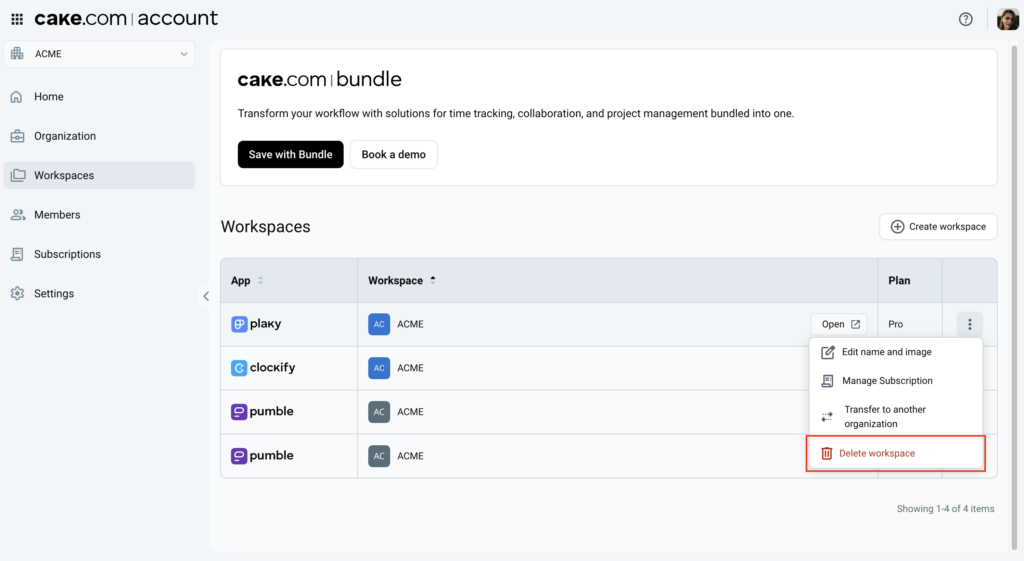
Each workspace can be deleted from the Workspaces page.
Delete a workspace #
Before deleting a workspace, the Organization owner must deactivate all active organization members within the workspace and remove any invited users. If these conditions aren’t met, the deletion process cannot be initiated.
To delete workspace in your organization:
- Navigate to
 Workspaces in the left sidebar
 - Click on the
 three-dot icon on the workspace row to open the workspace menu
 - Select the
 Delete workspace option
 - Click Delete in the confirmation dialog box to proceed with the workspace deletion
After deleting the workspace:
- Workspace and its data and users are permanently deleted and cannot be restored
- Organization owner and admin loses access to the workspace and is removed from all workspace lists
- If the workspace is part of an individual subscription, that subscription is immediately canceled and cannot be used
- If the workspace is part of a Bundle subscription (and not the last workspace in the organization), the subscription remains active and unaffected for the remaining workspaces
Check out this article to learn more about the ways to backup your Clockify, Pumble or Plaky workspace data.
Delete the last workspace #
If the owner attempts to delete the last workspace in the organization, the entire organization will also be deleted. This action results in some additional changes.
That includes the following:
- Whole organization, data and users are permanently deleted
- All active subscriptions (individual and Bundle) are immediately cancelled and are not available for the remaining period
Organization owners can delete any workspace they own.
Deleting the last workspace within an organization results in a complete data deletion.