Allow temporary support access
Grant temporary support access lets you temporarily allow view-only access to CAKE.com Support in your organization. When enabled, it allows the support team to securely access your organization to investigate and troubleshoot issues faster.
Permissions #
- Only organization owners and admins can enable this feature
- CAKE.com support can only access top-level configurations (e.g. organization settings) in the organization within the selected time period
When to use temporary support access #
If you are working with a CAKE.com support agent and the issue is too complex to solve, you can enable temporary support access only when they specifically request it. This lets the support agent securely investigate your workspace and ensures that only necessary access is granted to an authorized person for a specified time period (7 days, 14 days or 30 days).
Enable temporary access to your organization #
This feature is disabled by default and needs to be enabled by the organization owner or admin. The system automatically disables the toggle once the specified time period ends.
CAKE.com Support cannot access your organization unless this feature is enabled.
To enable temporary access:
- From the CAKE.com homepage, click on your profile picture then select
My account
- Click
Settings
- Toggle the Grant temporary support access switch to ON
- In the Enable support access dialog box, select the Access duration from the dropdown list (e.g. 7 days)
- Click Enable
Once enabled, you will see a timestamp indicating the exact time when the temporary access automatically expires.
Disable temporary access to your organization #
You can disable this feature at any time before the selected time period automatically expires.
To disable temporary access:
- From the CAKE.com homepage, click on your profile picture then select
My account
- Click
Settings
- Toggle the Grant temporary support access switch to OFF
- Review the warning message in the Disable support access dialog box
- Click Disable
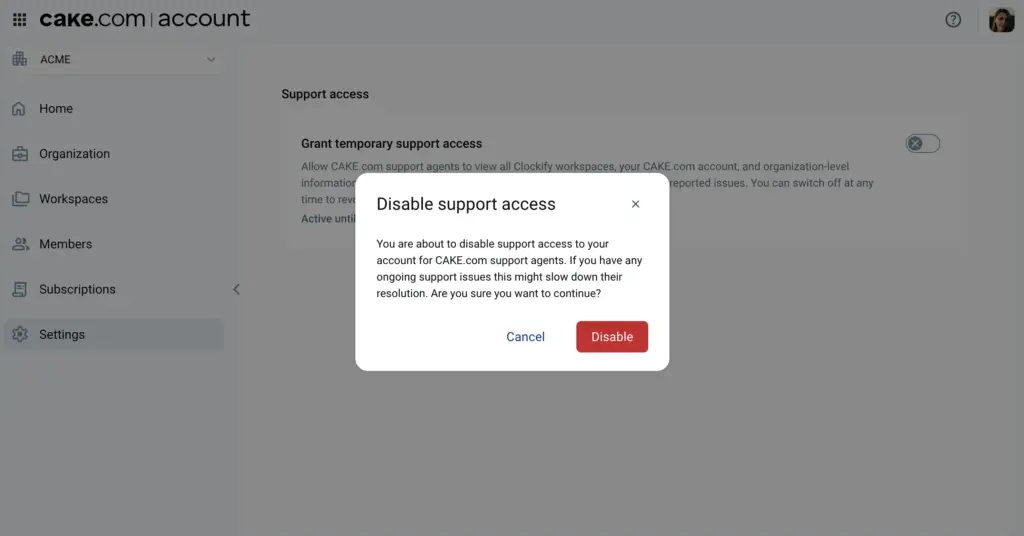
The system disables the temporary access and CAKE.com support agents will no longer have access to your organization.
FAQs #
Do I need a subscription plan to use this feature?
No. This feature is available in all plans.
Who can enable temporary support access?
Only organization owners and admins can enable this feature in the CAKE.com homepage.
Does the support team have permanent access?
No. You can grant access only for a specific time period (7 days, 14 days or 30 days) and it expires automatically once that period ends. You can also disable this feature at any time before the time period expires.
Can the support team access my other workspaces in Plaky and Pumble?
No. Access is limited only to top-level configurations in your CAKE.com organization and Clockify workspace. Your Plaky and Pumble workspaces remain private.