Published: September 24, 2026
Knowledge fragmentation is the gradual degradation of corporate knowledge, data, and documentation from structured order to fragmented, inconsistent chaos.
It’s what you get when several documents outline the same company policy differently; when standard operating procedures are scattered among emails, buried chat messages, and outdated docs; when your employees are forced to guess what they should do and how they should do it because they can’t find the answers that they know are buried somewhere in an email, a DM, or a doc.
The antidote to knowledge fragmentation is establishing a Single Source of Truth.
- A Single Source of Truth (SSOT) is a documentation hub where you keep all the up-to-date company information.
- An SSOT prevents knowledge fragmentation by breaking down information silos.
- An SSOT isn’t software; it’s a governance model you define.
- To implement an SSOT, choose its location, identify what data you’ll keep and who owns it, and create policies around how it should be managed and updated.
- SMBs can designate tools they already use as their SSOT instead of using a dedicated policy management tool to reduce software bloat and operational costs.
What is an SSOT?
In a non-technical corporate setting, a Single Source of Truth (SSOT) is the centralized storage location for company documentation. This includes company policies, SOPs, brand assets, KPIs, contract templates, approved vendor lists, service catalogs, and so on.
The most important letter in SSOT is the first S — single. It should be the only authoritative source of corporate information that other systems, messages, and team communication tools reference or link to, without duplicating it.
Why having an SSOT matters
The most important benefit of setting up and maintaining a Single Source of Truth within your company is that your employees know where they can find the most up-to-date company files and information, including:
- Policy-related documents, such as your PTO policy, AI policy, Health and Safety policy, Personal Data Protection Policy, etc.
- Design assets, such as logos, custom icons, UI/UX elements, brand imagery, templates, color palettes, etc.
- Strategic goal documents outlining the company’s OKRs and KPIs, and how they’re measured.
- Commercial pricing tiers and product/service catalogs, ensuring your sales and marketing teams always work from the latest information.
- Legal and financial templates, including approved contract templates for NDAs, MSAs, and SOWs.
- Expense and procurement rules, including mileage reimbursement rates, maximum per diem limits, and thresholds that require executive approval.
A technical SSOT can also serve as a centralized repository for your code. Copying the same code into several locations can cause different systems to show conflicting, outdated, or incorrect details.
By keeping your code in an SSOT, you ensure all data is created and edited in one master location. If anyone needs that code, they can reference or pull it from the SSOT instead of making copies.
Finally, an SSOT streamlines onboarding, since new employees can use it to easily find answers to everyday questions such as “Who approves my PTO when my manager is away?”
How to implement an SSOT
The first step in creating an SSOT is choosing where you’ll keep it.
An SSOT isn’t a piece of software — it’s a governance model you implement by setting rules for how information is stored, updated, and distributed at your company. You can use anything to serve as the SSOT repository, from a wiki or shared folder to the company project management tool.
My manager at CAKE.com made a task group on our Plaky team board titled Useful docs & guides. In it, she created separate items for different document categories — one with publishing schedules, another with social media templates, a third with documents outlining what new team members need to know. This became a single source of truth for the team.
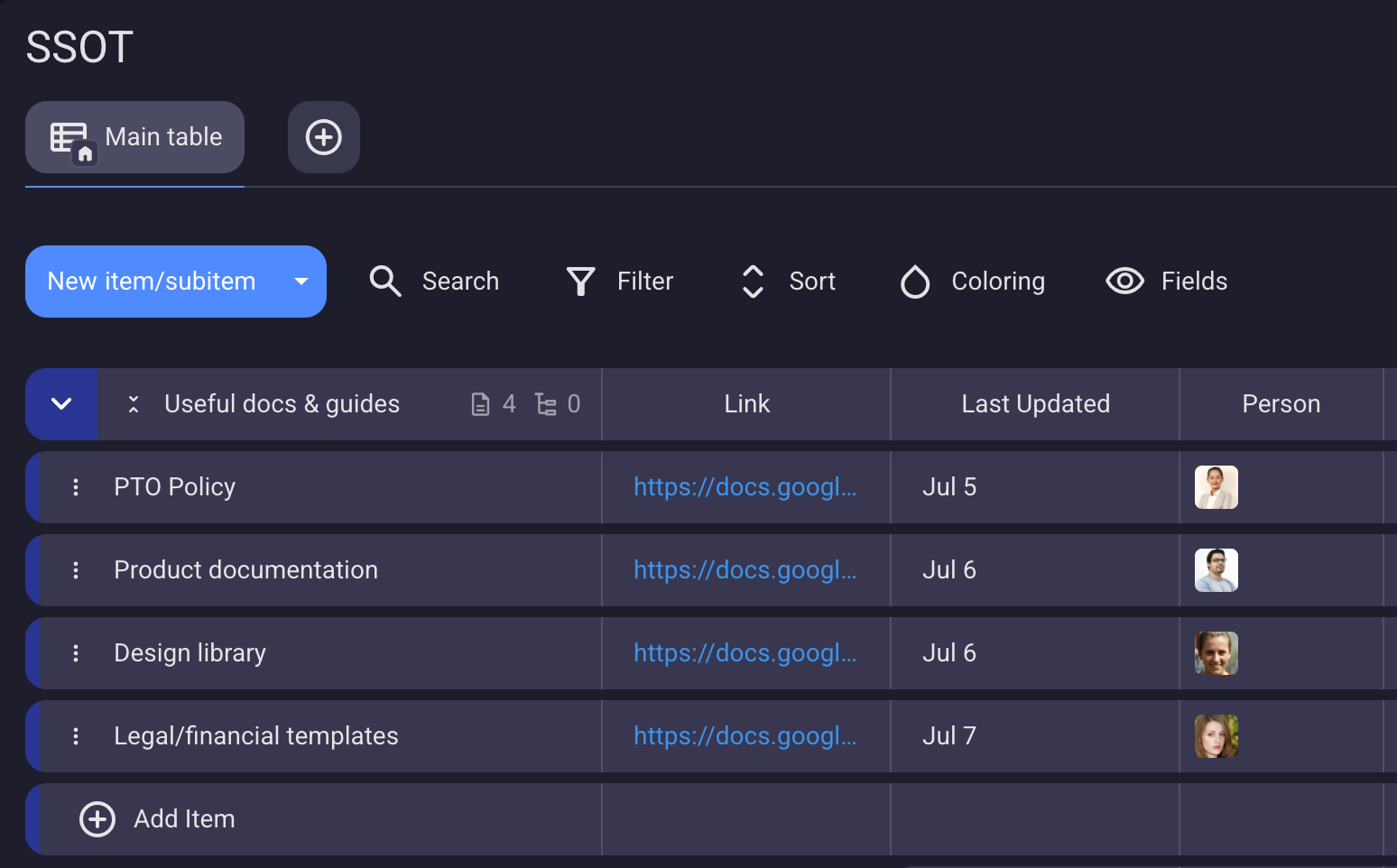
When my manager was on sick leave or PTO, I could still quickly check, say, the maximum file size and dimensions for social media images. It may sound trivial, but these are the sort of things that significantly slow down everyday work when you have to spend considerable time hunting down information.
Identify what data you’ll keep there, and define who owns the data — in Plaky, you can assign people to items to show this. You should also develop data governance policies that outline how and when the SSOT should be managed and updated — in Plaky, you can use the date field to show when each item was last updated.
Manage projects like a pro
Assign tasks, set deadlines, track progress, and keep collaboration focused with comments and file sharing — all in Plaky.
How to use Plaky by CAKE.com as an SSOT
Now, I want to be upfront: Plaky is not a policy management tool — it is a task management tool you can use as a documentation hub because of how customizable it is.
The workaround
Plaky lacks policy management features such as document creation, granular permissions, and attestation, but you can still use it as your SSOT with simple workarounds:
Instead of standard document creation, you can:
- Use Plaky’s rich text field to write policy outlines.
- Link to external documents with the Plaky board acting as the central hub where all the links are kept (what my manager did).
- Upload files to Plaky cards and replace them with newer versions whenever policies change.
As far as permissions go, policy management tools define who has editing permissions down to single paragraphs. Plaky’s board permissions are designed for task management, so your best bet is to customize board permissions within your SSOT board to comments and files only, so only you or a handful of executives can add and edit items/subitems and the text/links within them.
Instead of attestation — formally reviewing and verifying that you’ve read important policies and documents — you would use comments, polls, or reactions. At a large enough scale, Plaky will stop being viable for this, but SMBs with 50 or so employees aren’t even close to that scale.
The payoff
This may sound like jumping through hoops, but if you’re an SMB owner, it’s worth it because the payoff is immense — it’ll save you a lot of cash!
If your company has 50 people and a dedicated policy management tool costs just $5 per user per month, it will cost you $3,000 a year. And $5 is a conservative estimate given current market pricing.
SMBs have to stretch every dollar as far as it will go. Are paragraph-based text editing permissions worth $3,000 a year? I don’t think so. Research already shows that organizations waste 25% of their SaaS budget on unused and overlapping features.
Manage projects like a pro
Assign tasks, set deadlines, track progress, and keep collaboration focused with comments and file sharing — all in Plaky.
Don’t stop at knowledge fragmentation — consolidate your tech stack with customizable tools
Knowledge fragmentation happens naturally as your company grows and can seriously hurt productivity, so you need to tackle it in a smart way.
Dedicated policy management software exists for a reason — large enterprises and international organizations operate at a scale where workarounds cost more than paying for a subscription.
But it’s different for SMBs. At that scale, it’s better and more profitable to consolidate your tech stack as much as you can, and — in this case — that means creating an information hub that will serve as your SSOT within a tool that you already use.
Apply this principle to other company needs, and you’ll be able to reduce software bloat and lower operational costs that eat into your profit margins.
How we reviewed this post: Our writers & editors monitor the posts and update them when new information becomes available, to keep them fresh and relevant.