Published: July 2, 2026
Using AI in the workplace can be either good or bad for your company. This almost always depends on the people using it. Data shows that AI can increase productivity and save time, but also that it can cause errors and security breaches.
Welcome to the state of AI in the workplace statistics 2026.
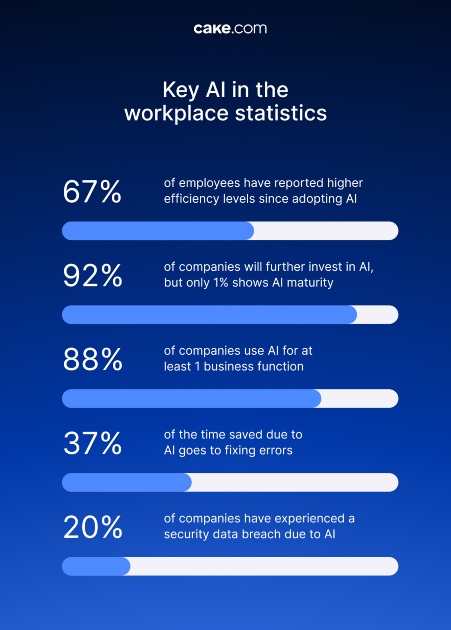
- 67% of employees have reported higher efficiency levels since adopting AI.
- 92% of companies will further invest in AI, but only 1% shows AI maturity.
- 88% of companies use AI for at least 1 business function.
- 37% of the time saved due to AI goes to fixing errors.
- 20% of companies have experienced a security data breach due to AI.
The % of AI usage in companies
Let’s see the AI adoption rates in companies globally.
The total use of AI has reached 66%
According to Gallup’s AI data, the use of AI among remote workers has increased from 28% in 2023 to 66% in 2025. The frequent use of AI has also risen from 13% in 2023 to 40% in 2025. The rise was not as drastic for non-remote employees, where the total use of AI has risen from 15% to 32%, and frequent use from 8% to 17%.
The difference in adoption is also witnessed in large vs. small companies. Small companies have a much lower AI adoption rate (11.9%) when compared to bigger companies (40%), according to the OECD AI adoption study for G7 countries (Canada, France, Germany, Italy, Japan, the United Kingdom, and the United States).
92% of companies plan to increase investment in AI
Within the next 3 years, 92% of companies plan to further invest in AI, as per McKinsey’s 2025 AI report.
However, despite extensive investment, we are yet to witness a true return on investment. According to the same report, only 1% of leaders deem their companies AI mature, which would include completely integrating AI into their workflow and driving a significant outcome from that workflow.
58% of employees use AI at work regularly
The University of Melbourne’s Trust, attitudes and use of artificial intelligence global study showed that 58% of employees regularly use AI at work. It also showed that the use of AI is higher in emerging economies (72%) than in advanced economies (49%).
Among AI users, 70% use public AI tools such as ChatGPT, whereas only 42% use AI tools that their employer provided them.
~88% of organizations use AI in at least one function
The Founder Reports’ AI in the Workplace 2026 study found that 89% of workers admit to using AI for work on at least some level. These findings are similar to McKinsey’s findings from their study, The state of AI in 2025, which shows 88% of organizations use AI in at least one function, which is an increase from the previous year’s 78%.
45% of ICT companies use AI
The type of sector largely determines the percentage of companies that have adopted AI. Here are the percentages based on different sectors according to the OECD study:
- Construction (7.2%)
- Accommodation and food service activities (7.8%)
- Transportation and storage (9.2%)
- Professional, scientific, and technical activities (25%)
- Information and communication technology (45%)
However, the same study found that AI is mostly used for peripheral tasks. Only 29% of SMEs use AI for their core tasks.
26% of employees report increased workload, stress, and pressure due to AI
A big chunk of employees report only positive impacts of AI on their work, such as significantly increased:
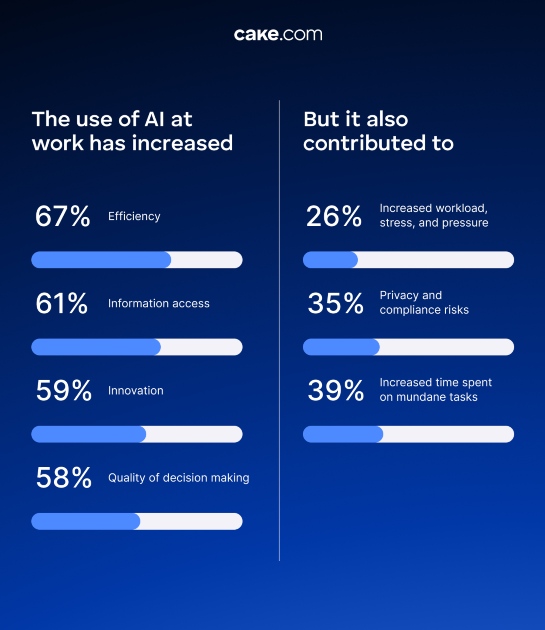
- Efficiency (67%)
- Information access (61%)
- Innovation (59%)
- Quality of decision making (58%)
However, there are also reports of the negative AI impact on work, such as:
- Increased workload, stress, and pressure (26%)
- Privacy and compliance risks (35%)
- Increased time spent on mundane tasks (39%)
Conclusions for the % of AI usage in companies
While AI usage levels vary by industry, the global data shows that AI tools are the present and the future of the majority of companies. But we should not forget that using AI at work is a nuanced matter which requires caution above all, and that often what seems appealing may be just a masked security risk, or even a waste of time.
Does using AI save time, and where does that saved time actually go?
Research shows AI saves the time it takes to perform a certain task, especially for managers. However, for employees, this time is partially used for fixing AI-related mistakes and partially for managing AI tools, which creates the impression that AI does not save much time, after all.
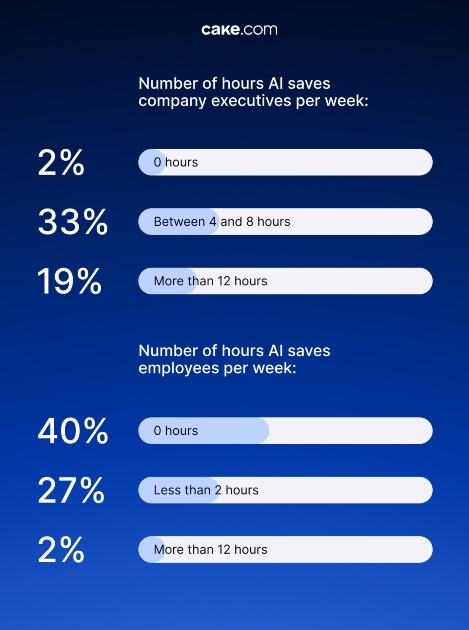
There’s also a difference between leaders and employees in terms of perceived time savings due to AI use, according to the AI proficiency report 2026. Company executives find that using AI saves them the following time per week:
- 0 hours (2%)
- Between 4 and 8 hours (33%)
- More than 12 hours (19%)
Employees, however, find that using AI saves them less time per week:
- 0 hours (40%)
- Less than 2 hours (27%)
- More than 12 hours (2%)
Another study, conducted by SAP and presented in a Forbes article, shows that 58% of employees report that using AI saves them time (52 minutes a day on average).
When asked who they believe this saved time belongs to, 46% said it belonged to them, and not their company. However, 77% of employees still spend at least half of their saved time on work-related activities, with 23% of them spending that same time on personal activities.
This data indicates that AI will not necessarily help employees spend less time working, rather, it could enable them to do a larger amount of work during the same work hours.
But, some of that time will still be spent on fixing AI’s mistakes. As per Workday’s Human Connection in the AI Era research, 37% of saved time goes straight to fixing errors made by AI. And, the University of Melbourne global study showed that over half (56%) of employees admit they made work-related mistakes due to AI. The fact that 66% of employees never evaluated the AI output they received is not helping matters.
So, overseeing and managing AI tools is a vital part of the process. And, as a Harvard Business Review article explains, it’s leading to AI brain fry, i.e. cognitive exhaustion and mental fatigue. Managing AI tools requires 14% more mental effort and increases mental fatigue for 12%.
Eventually, if we look at only the rising concerns that AI will take over the work of employees, most of this sounds somewhat reassuring. The current state shows that employees are a key component of successful AI tool usage at work.
Human connection at work in times of AI dominance
We’ve explored Workday’s research even further to look into how employees’ connection has evolved since the introduction of AI.
33% of employees don’t engage in conversations that aren’t strictly about work
Chatting at work is slowly phasing out, according to statistics. 33% of employees admit to rarely or never talking to their co-workers unless it’s about work-related tasks, since AI came into the picture.
Less than half (46%) believe it’s easy to make friends at work. This doesn’t come as a surprise since 71% of employees feel AI is notably “patient” with them, as opposed to 56% of them feeling the same way about co-workers.
14% of employees have taken time off because of loneliness
Loneliness and/or social isolation were the main cause of time off for 14% of employees.
The reason for this may be that employees are now turning to AI for things they would normally turn to a colleague for. For example, employees now use AI to:
- Get advice (76%)
- Brainstorm (52%)
- Get companionship (37%)
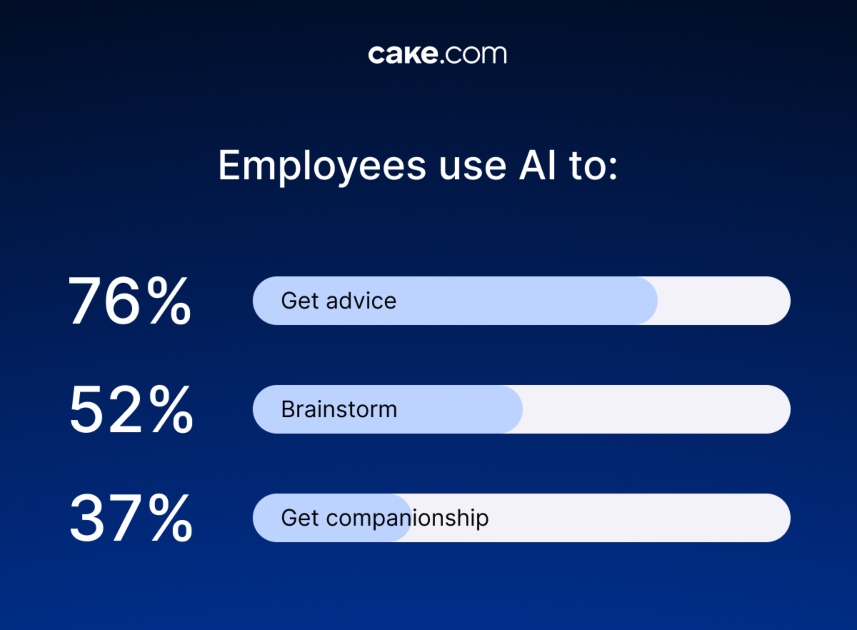
The AI-human connection has increased so much that 43% of employees now fear reduced human-to-human interaction even more than losing their jobs.
On the other hand, according to a Forbes 2026 article on employee loneliness, when employees let AI do the low-value work, it actually creates more time for employees to make meaningful connections at work. From this perspective, AI isn’t seen as the workplace relationship enemy, it is seen as a facilitating factor.
Human-to-human interaction is as valuable a part of the job as successful task performance is. However, much like anything else, this connection is fragile and must be worked hard at to achieve and keep alive, regardless of whether AI is present or not.
The years in front of us will show just how fragile it is and the extent to which we will work to restore what we’re now losing.
The use of shadow AI at work
Shadow AI or unauthorized AI tools usage is widely spread among workplaces. This is a growing concern for companies as inputting sensitive information into AI tools can have major consequences for data security.
Let’s see how employees use shadow AI at work and at what cost.
78% of employees use their own AI tools for work
According to Microsoft’s Work Trend Index 2024 report, as many as 78% of employees bring their own AI tools to work. Another study by Varonis, the 2025 State of Data Security Report, shows that 98% use unsanctioned AI and IT apps.
29% of employees pay for their own AI tools
While 68% of employees admit to using free tools such as ChatGPT, according to MenloSecurity’s 2025 Report: How AI is Shaping the Modern Workspace, 29% of employees pay for private AI tools that they use at work.
While it is positive that employees want to use AI tools to do their work more productively, the fact that employees use shadow AI and pay for AI tools from their own pocket is far from beneficial, having in mind the potential risks and concerns these actions carry.
The state and cost of sharing the company’s sensitive data with AI tools
Employees have intentionally (or not) been sharing some of the sensitive information from their workplace via their AI tools. Such behavior can lead to unwanted consequences.
Let’s get into more details.
43% of employees have entered sensitive information into AI tools
Using AI at work is a fertile ground for inputting sensitive company data and endangering information security. For instance, 43% of employees admit they have entered sensitive information into AI tools without the company’s permission, according to the National Cybersecurity Alliance’s 2025 research.
63% of employees witnessed other employees using AI in an inappropriate way
According to the University of Melbourne’s Global 2025 study, around 48-49% of employees admit to having uploaded financial, sales, or customer information, as well as copyrighted material, into public AI tools.
The same study shows that 47% of employees admit they have used AI in inappropriate ways. Additionally, 63% of employees claim they have witnessed other employees using AI in an inappropriate way.
But who is to blame?
Is it the employees who have access to different AI tools, or the employers and managers who are potentially not even aware that this is happening?
78% of companies don’t have a clean AI integration plan
According to the Gallup 2025 AI survey, 78% of companies never communicated a clear plan for AI integration in the workplace.
Additionally, the National Cybersecurity Alliance’s 2025 research shows that a staggering 58% of employees did not receive formal training on safe AI use in the workplace.
It is paramount to conduct training and set clear policies on AI training, as the consequences of misuse can be costly.
47% of employees report that their companies have suffered at least 1 negative consequence due to AI
IBM’s Cost of a Data Breach Report 2025 shows that 20% of organizations have suffered a security data breach because of shadow AI use. Another 47% of employees claim their companies experienced at least 1 negative consequence from Gen AI use, according to McKinsey’s The State of AI report 2025.
The most evident consequence is the financial one. The average shadow AI breach cost is $670,000 for companies that frequently use shadow AI, the IBM 2025 report shows.
The numbers can get even higher. Two such examples are the companies BetterHelp and GoodRx. They used pixel-based AI tracking tools which transmitted patients’ health data to ad platforms without the patients’ consent. BetterHelp ended up settling charges at $7.8M, whereas GoodRx settled them for $1.5M.
Companies need solid infrastructure to enjoy the benefits of AI
AI is not the productivity holy grail.
Rather, it’s a massive, still unknown area that requires firm policies, education, and exploration. To be able to wisely implement AI, you need the right infrastructure.
With CAKE.com Suite, you get 3 tools that can aid you when dealing with AI tools.
The team communication tool, Pumble, is a perfect platform for exchanging ideas and discussing potential uses of AI. But, even more than that, Pumble now has an MCP Server, which enables you to directly connect Pumble with popular AI tools such as Claude, Gemini, and others.
The time tracking tool, Clockify, serves as a constant reminder not to spend too many hours exploring AI. It helps your team to not get lost in numerous AI tools and instead focus more time on their primary tasks.
The task management tool, Plaky, helps you manage and standardize complex AI processes. For illustration, when using a certain AI tool, you have to monitor how the tool operates and its results, and also check the validity of those results. These actions require multiple steps, which you can turn into tasks and subtasks on Plaky. Since there is a Clockify-Plaky integration, you can also easily track how many hours your team has spent on these tasks.
You can use these tools without the fear of inputting sensitive information and this backfiring at you, or the fear of reduced human connection. In fact, these tools encourage collaboration, productivity, and safety as they are compliant with GDPR and designed to protect your data.
Maximize your AI ROI with CAKE.com
We have seen how AI can both benefit the companies but also cost them if they’re not careful enough. This is why you need an efficient system to support your work and to help you maximize your AI gains.
When team communication is top-notch, when task management is smooth, and you’re putting in hours right where you need them, you can take maximum advantage of AI tools.
How we reviewed this post: Our writers & editors monitor the posts and update them when new information becomes available, to keep them fresh and relevant.